Active Directory Health Check with PowerShell + HTML Dashboard
Run a complete Active Directory health check using PowerShell and automatically generate a clean, readable HTML dashboard. This guide shows you how to assess domain health, replication status, and critical AD services using a simple script.
Whether you’re a system administrator or IT engineer, this automated approach helps you detect issues early and maintain a healthy AD environment.
Why Perform an Active Directory Health Check
Prevent replication failures
Detect domain controller issues
Ensure authentication reliability
Improve overall infrastructure stability
Keeping Active Directory healthy is not optional. AD is the authentication backbone of nearly every on‑premises and hybrid Microsoft environment. Replication issues, DNS misconfigurations, SYSVOL problems, or neglected patching on domain controllers can silently introduce outages, authentication failures, or security gaps.
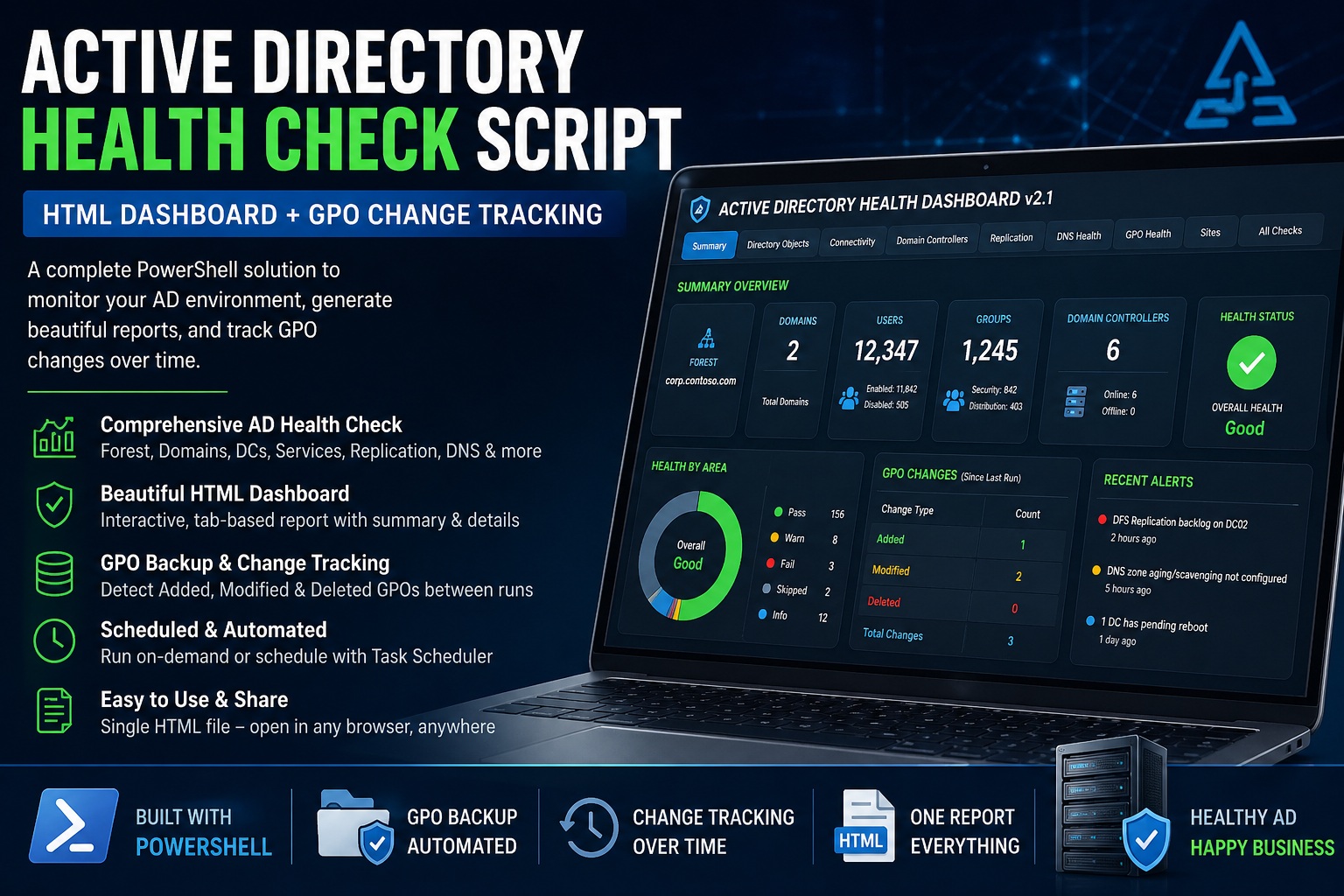
To address this, I built Invoke‑ADHealthCheck v2.1, a PowerShell‑based Active Directory health check that produces a single, self‑contained HTML dashboard covering the entire forest.
This post walks through:
- What the script checks
- How it works internally
- Why each check matters
- How to run it safely in production
- How to interpret the HTML dashboard results
👉 Download the script: GITHUB
👉 View a sample published report: Click here
🔍 What This Active Directory Health Check Covers
Unlike single‑purpose tools, this script is designed to give you a holistic forest‑level view in one execution.
✔ Forest & Domain Discovery
- Detects the current AD forest
- Enumerates all domains
- Discovers every domain controller, including:
- Site membership
- OS version
- Functional levels
This ensures no DC is silently excluded, including branch or legacy site controllers.
🌐 Connectivity & Firewall Validation (DC Reachability)
A common root cause of AD failures is incorrect firewall rules.
The script tests TCP connectivity from the execution host to every DC for required AD management ports, including:
| Port | Purpose |
|---|---|
| 53 | DNS |
| 88 | Kerberos |
| 135 | RPC Endpoint Mapper |
| 389 | LDAP |
| 445 | SYSVOL / NETLOGON |
| 3268 | Global Catalog |
| 9389 | AD Web Services |
✅ Required
⚠ Recommended
ℹ Optional (WinRM)
Each DC receives:
- Pass / Warn / Fail status
- Clear firewall remediation guidance
This is extremely useful in segmented networks or zero‑trust environments.
🧩 Domain Controller Inventory & Patch Health
For each domain controller, the report captures:
- Windows Server version
- OS build number
- Last boot time
- Installed hotfix count
- Latest installed patch
- Patch age warning (configurable threshold)
This quickly highlights:
- Forgotten DCs
- Servers missing monthly security updates
- DCs that haven’t been restarted after patching
🔁 Replication Health & Metadata Analysis
Replication failures are among the most dangerous AD issues.
This script uses:
- repadmin /replsummary
- Detailed naming context replication metadata
It detects:
- Replication failures
- Stale replication beyond site schedules
- Non‑zero replication result codes
- Partner‑specific errors
Failures automatically generate actionable recommendations in the report.
🌍 DNS Health for Active Directory
Since AD is DNS‑dependent, the script validates:
- Forest and domain DC locator records
- SRV record resolution
- DNS service health
- Forwarder responsiveness (with warnings, not false failures)
DNS failures are clearly tied back to specific domain controllers, not just generic “DNS errors.”
📦 SYSVOL & NETLOGON Validation
The script verifies:
- SYSVOL accessibility
- NETLOGON share availability
- DFS Replication service health
These checks prevent:
- Broken Group Policy processing
- Inconsistent policy deployment
- Silent authentication impacts
📜 Group Policy Health, Backups & Change Tracking
Group Policy is often overlooked until it breaks. This script proactively checks:
✅ AD vs SYSVOL Version Consistency
- Detects mismatches between:
- AD version
- SYSVOL version
💾 Automated GPO Backups
- Creates timestamped GPO backups
- Compares against previous run
- Tracks:
- Added GPOs
- Removed GPOs
- Changed versions
This effectively creates a GPO change audit trail without third‑party tools.
👑 Privileged Group Membership Review
Security‑focused environments will appreciate:
- Recursive membership analysis for:
- Domain Admins
- Enterprise Admins
- Schema Admins
- User vs nested group distinction
- Per‑domain and forest‑wide visibility
This helps identify:
- Excessive privilege
- Stale admin accounts
- Unexpected group nesting
📊 Directory Object Statistics
The dashboard also includes:
- Enabled vs disabled user counts
- Total group counts by type
- Visual pie charts per domain
This is useful for:
- Cleanup planning
- Identity hygiene
- High‑level reporting to stakeholders
📑 Event Log Health (Optional)
When enabled, the script collects recent:
- Directory Service errors
- DNS Server errors
- DFS Replication events
- System critical errors
This bridges the gap between configuration health and operational reality.
🖥 The Interactive HTML Dashboard
The generated HTML report is:
✅ Fully self‑contained
✅ No external JS or CSS
✅ Works offline
✅ Secure to email or archive
Features include:
- Tab‑based navigation
- Searchable and filterable tables
- Color‑coded health indicators
- Executive summary cards
- Technical drill‑down sections
- Built‑in recommendations engine
The dashboard is suitable for:
- Engineers
- Auditors
- Architects
- Management summaries
▶ How to Run the Script
Prerequisites
- Domain‑joined machine
- RSAT installed
- PowerShell 5.1 or newer
- Read access to AD
- Network access to domain controllers
Basic Execution
PowerShell
.\Invoke-ADHealthCheck-v2.1.ps1
Show more lines
Output
- Automatically generates a timestamped HTML dashboard
- Optionally opens it at completion
🎯 Why I Built This
Most AD health tools are either:
- Fragmented
- Non‑visual
- Commercial
- Too shallow for real troubleshooting
This script was built to:
- Be transparent
- Be audit‑friendly
- Work without agents
- Produce clear remediation guidance
It complements native Microsoft tools rather than replacing them.
💬 What Do You Think?
I built this script to solve real-world Active Directory challenges—especially around visibility, reporting, and GPO change tracking without relying on expensive tools.
But I’m sure every environment is different.
👉 How are you currently monitoring your AD health?
👉 Do you already have a script, or are you using third-party tools?
👉 What additional checks or features would you like to see in the next version?
Drop your thoughts in the comments 👇 — I actively read and respond.
🔄 What’s Coming Next?
I’m planning to enhance this script with:
- Email alerts for critical failures
- Historical trend reporting
- Integration with Microsoft 365 / Azure AD
- Auto-remediation suggestions
If that sounds useful, let me know — your feedback will shape the next version.
⭐ If You Found This Useful
- Share this post with your IT team
- Bookmark it for future reference
- Try the script and give feedback
And if you like it…