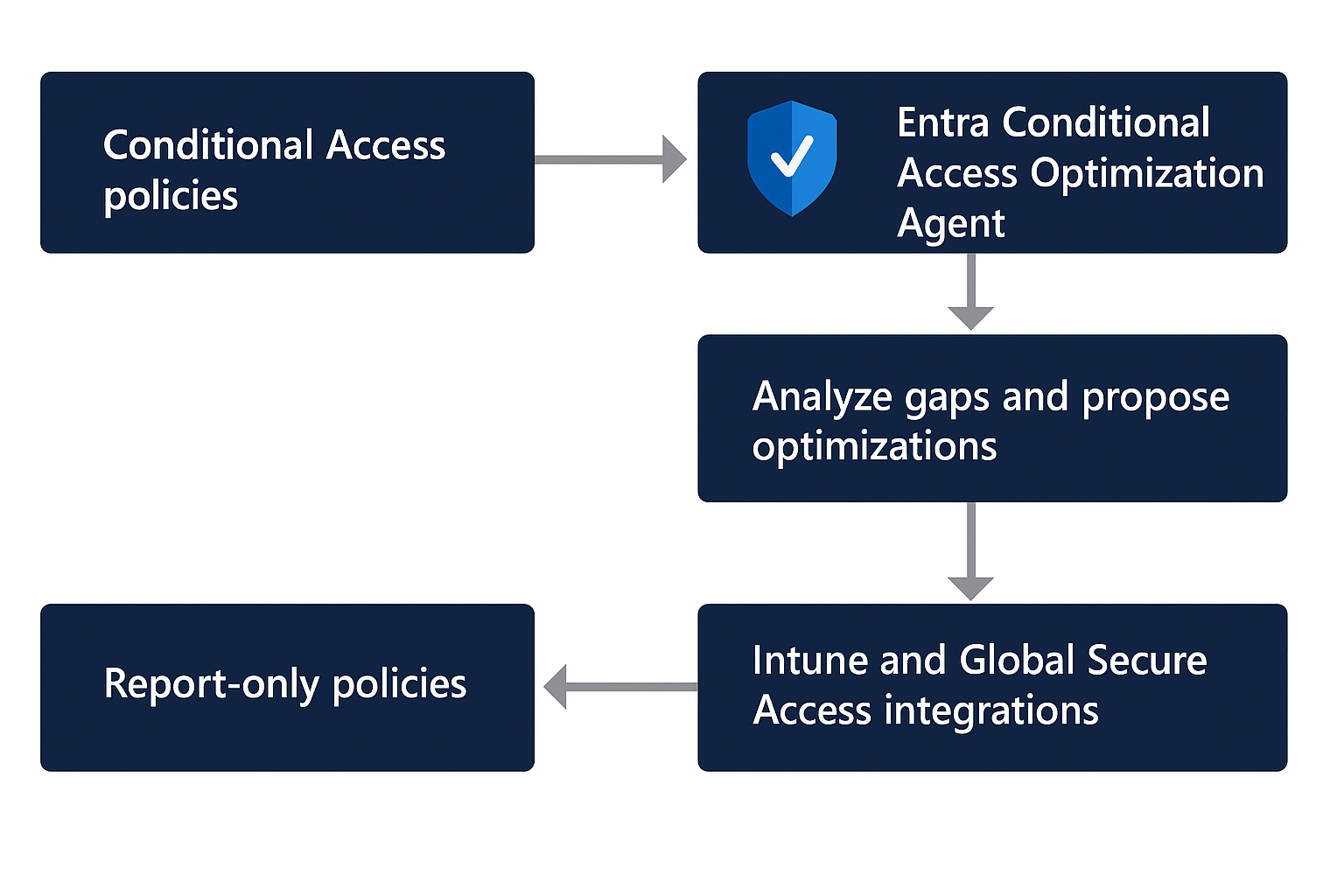
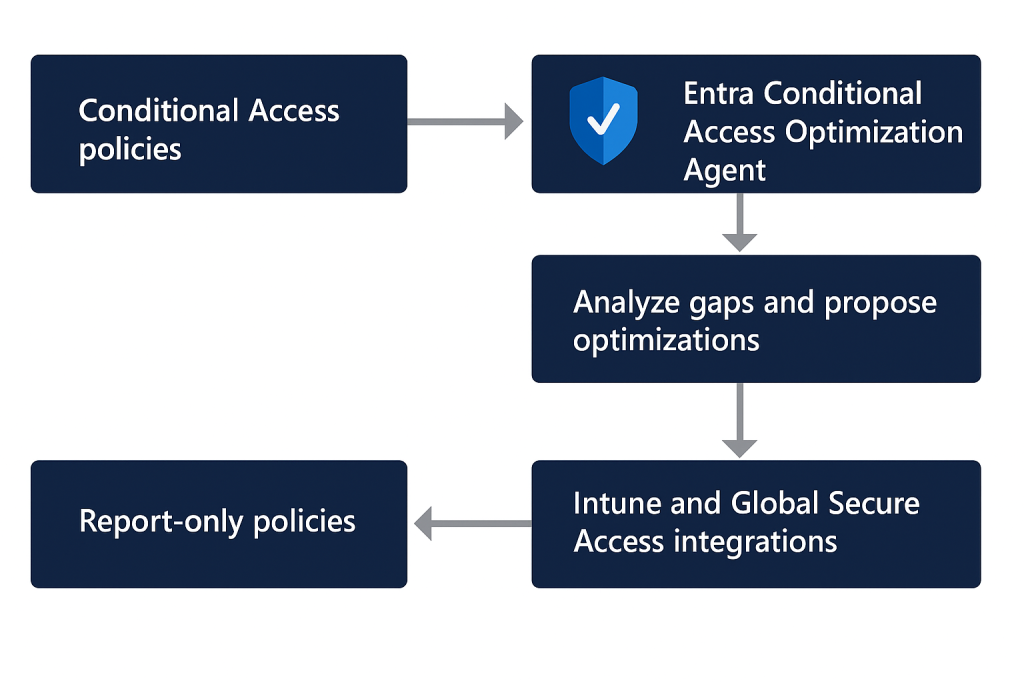
Conditional Access has become the policy enforcement core of Microsoft’s Zero Trust model, but at scale it is notoriously difficult to maintain. Policies drift over time, new users and applications appear outside expected baselines, exclusions accumulate, and overlapping rules create blind spots or operational friction. Microsoft’s answer to that problem is the Conditional Access Optimization Agent in Microsoft Entra, powered by Microsoft Security Copilot. The agent continuously inspects Conditional Access posture, identifies gaps or redundancies, and proposes remediations that administrators can review and approve. [learn.microsoft.com], [learn.microsoft.com]
What makes this capability more interesting than yet another reporting surface is that it is not limited to static visibility. The agent can recommend new policies, modifications to existing policies, consolidation of overlapping policies, and even generate policy review reports when spikes or dips in activity suggest misconfiguration. New policies are created in report-only mode, and the agent does not change existing policies without explicit administrator approval, which makes it far more suitable for production governance than fully autonomous policy mutation. [learn.microsoft.com], [learn.microsoft.com]
From an architecture and operations perspective, the Conditional Access Optimization Agent sits at the intersection of Microsoft Entra Conditional Access, Security Copilot compute, and your tenant’s identity and device signals. The official documentation states that the agent scans your tenant for new users, applications, and agent identities from the previous 24 hours, determines whether appropriate Conditional Access protections exist, and then proposes next steps where coverage is missing. The platform also treats Conditional Access as Microsoft’s Zero Trust policy engine, which means the agent’s recommendations are grounded in the same identity-, device-, and risk-aware access model that underpins Entra’s broader access control framework. [learn.microsoft.com], [learn.microsoft.com]
Why this agent matters in real-world environments
In mature tenants, the challenge is rarely “do we have Conditional Access?” but rather “are the right users, applications, devices, and identities actually covered by the right policies?” The Optimization Agent targets exactly that problem space. It evaluates scenarios such as requiring MFA, enforcing device-based controls like compliance or app protection, blocking legacy authentication, blocking device code flow, identifying risky users and risky sign-ins when P2 capabilities are present, and proposing policy consolidation where multiple policies deliver materially identical grant controls. It also includes deeper analysis features to detect unusual policy exceptions and gaps that would be easy to miss in large tenants. [learn.microsoft.com], [learn.microsoft.com]
This is an important distinction from Copilot Chat. Microsoft explicitly positions the Optimization Agent as the tool for continuous policy assessment, tenant-specific configuration reasoning, and automated improvement suggestions, while Copilot Chat is better suited to interactive troubleshooting, on-demand questions, and understanding how a specific policy affects a specific user or sign-in path. In other words, Chat helps you investigate; the Optimization Agent helps you continuously improve posture. [learn.microsoft.com], [learn.microsoft.com]
Licensing, permissions, and compute prerequisites
Before enabling the agent, organizations need to satisfy a few hard requirements. Microsoft requires at least Microsoft Entra ID P1, available Security Compute Units (SCUs), and the appropriate roles. On average, each agent run consumes less than one SCU, although Microsoft also notes that at least one SCU must be provisioned in the tenant for Security Copilot and that provisioned SCU is billed monthly even if consumption is low. For environments that want risk-based policy recommendations such as high-risk user remediation or high-risk sign-in MFA, those capabilities require Microsoft Entra ID P2. [learn.microsoft.com], [learn.microsoft.com]
Role design is equally important. According to Microsoft, Security Administrator is required to activate the agent initially. Security Reader and Global Reader can view suggestions but cannot take action, while Conditional Access Administrator and Security Administrator can review and act on recommendations. Microsoft also supports assigning Conditional Access Administrators with Security Copilot access so they can use the agent directly. For some specific integrations, additional role context matters: for example, Intune-backed device suggestions require the agent to operate with broader visibility than Conditional Access Administrator alone. [learn.microsoft.com], [learn.microsoft.com]
Under the newer security model, the agent can run using Microsoft Entra Agent ID instead of a human administrator’s identity. New installations default to an agent identity, existing deployments can migrate to it, and Microsoft states that customers cannot switch back to the old user-context model after migrating. The move is significant because it reduces dependency on human role activation state and improves security isolation. Microsoft documents that the agent identity is automatically assigned a defined permission set including AuditLog.Read.All, GroupMember.Read.All, Policy.Read.All, Policy.Create.ConditionalAccessRO, User.Read.All, NetworkAccess.Read.All, and relevant Intune configuration read scopes among others. [learn.microsoft.com]
How the execution pipeline actually works
One of the most useful technical details in Microsoft’s documentation is the breakdown between scan and action. The initial analysis pipeline — scanning all Conditional Access policies in the tenant, checking for gaps or possible combinations, and comparing findings against previous suggestions so the same recommendation is not repeated — does not consume SCUs. SCUs are consumed only when the agent proceeds to action-oriented reasoning, such as identifying a new gap or a policy pair suitable for consolidation, evaluating custom instructions, and generating a new report-only policy or a concrete modification recommendation. [learn.microsoft.com]
This matters operationally because it shows Microsoft designed the service to separate continuous monitoring from active recommendation generation. In practice, that means security teams can leave the agent running for posture awareness, while compute cost is concentrated on moments where the system is actually producing policy artifacts or change suggestions. It also explains why the product is opinionated about automation boundaries: the agent will create a new policy in report-only mode if allowed by configuration, but it still expects a human administrator to turn it on or approve changes to existing policies. [learn.microsoft.com], [learn.microsoft.com]
Core recommendation domains
Administrators evaluating the product should think of the recommendation engine in several control families:
- MFA enforcement for users missing coverage from a policy that requires MFA. [learn.microsoft.com]
- Device-based controls, including device compliance, app protection policies, and domain-joined device scenarios. [learn.microsoft.com], [learn.microsoft.com]
- Legacy authentication blocking to prevent outdated protocols from bypassing modern protections. [learn.microsoft.com]
- Device code flow blocking, which is increasingly relevant for modern auth abuse scenarios. [learn.microsoft.com]
- Risk-based policies for high-risk users, high-risk sign-ins, and risky agents when P2 is available. [learn.microsoft.com], [learn.microsoft.com]
- Policy consolidation, where the agent identifies enabled policies with overlapping settings and suggests merging them if they differ by no more than two conditions or controls. [learn.microsoft.com]
- Deep analysis, which looks for outlier policies with too many exceptions or none at all, helping identify both coverage holes and lockout risk. [learn.microsoft.com], [learn.microsoft.com]
The MFA gap analysis feature deserves special attention. Microsoft documents that this deep analysis can inspect all enabled Conditional Access policies in the tenant, not just changes seen in the last 24 hours, to identify users not covered by any MFA policy. It does not count report-only policies as effective coverage, and if more than 100 uncovered users are found, it surfaces a prioritized sample alongside the total count. This is the kind of tenant-wide reasoning many teams previously tried to approximate with workbooks, custom KQL, or spreadsheet joins. [learn.microsoft.com]
Review, explainability, and change safety
A frequent concern with AI-driven administration is explainability, and this is one area where Microsoft’s design is stronger than many competing approaches. Each recommendation includes policy details, a policy impact view, and a full activity summary that explains how the agent arrived at the suggestion. If the recommendation is to modify an existing policy, administrators can inspect the proposed delta in both summary form and JSON form, and for changes involving users or applications, they can download a JSON file of impacted objects. [learn.microsoft.com]
That review process is critical because Conditional Access changes can be operationally dangerous. Microsoft explicitly recommends reviewing the information before turning on new policies or approving modifications. The agent also supports workflow states such as mark suggestion as reviewed, snooze for 14 days, and add notes, which allows teams to treat recommendations as governed security work rather than ephemeral AI prompts. The ability to detect spikes or dips in policy-related activity and surface policy review reports is another useful safeguard, because changes in policy behavior often show up first as sign-in anomalies rather than clean rule failures. [learn.microsoft.com]
Settings that matter in production
The settings model is more capable than many admins realize. The agent runs automatically every 24 hours by default, and administrators can also trigger manual runs. Microsoft additionally offers activity-based runs that can fire when relevant tenant changes occur, although the platform rate-limits these triggers to no more than once every six hours. Microsoft currently labels activity-based runs, ServiceNow integration, and file upload capability as Preview features. [learn.microsoft.com], [learn.microsoft.com]
One of the most powerful settings is custom instructions. These instructions act like governance hints injected into the agent’s execution, allowing you to specify exclusions, role-based exceptions, policy design rules, and organization-specific constraints. Microsoft even gives a concrete pattern for guest governance: create a dynamic group for guests and instruct the agent to exclude that group from baseline policy reasoning, which helps avoid unnecessary SCU consumption and irrelevant recommendations for guest accounts. This is a practical way to adapt generic Zero Trust guidance to the realities of your tenant. [learn.microsoft.com]
The newer knowledge base feature goes further. In preview, the agent can ingest a single Word (.docx) or PDF document up to 5 MB that describes your organization’s Conditional Access standards. Microsoft says the agent parses that document, creates a structured understanding of your guidance, and applies it to future recommendations — not retroactively to existing ones. The knowledge base is particularly valuable for organizations with strict policy naming conventions, clear persona-based policy separation (admins versus workforce versus contractors), and non-negotiable break-glass exclusion rules. [learn.microsoft.com]
Integrations: Intune, Global Secure Access, Teams, and ServiceNow
The integration story is one of the strongest reasons to take the agent seriously. With Microsoft Intune, the agent can reason about whether Conditional Access is actually enforcing the device compliance or app protection assumptions that exist in Intune policy. Microsoft’s example is especially useful: if an Intune app protection policy targets a group like Finance but no Conditional Access policy requires approved client apps for that platform, the agent can propose a report-only policy to close the gap. For environments with strong mobile controls, this closes a longstanding disconnect between configuration intent and enforcement reality. [learn.microsoft.com], [learn.microsoft.com]
With Global Secure Access — Microsoft Entra Internet Access and Private Access — the agent can recommend policies that require access to corporate resources through approved secure channels. That effectively links identity enforcement with network path enforcement, a pattern that is increasingly important as organizations try to prevent unmanaged network paths from reaching sensitive SaaS or private applications. [learn.microsoft.com], [learn.microsoft.com]
Operational collaboration is also built in. The agent can send Microsoft Teams notifications when new suggestions appear, although the communication is currently one-way. Microsoft limits notifications to up to 10 recipients, and a configured group must not exceed that size; additionally, only five recipient objects can be configured in total. For organizations using change management, Microsoft also offers a ServiceNow integration in preview that can create change requests for new suggestions, allowing recommendations to move through existing approval workflows before implementation. [learn.microsoft.com], [learn.microsoft.com]
Advanced capabilities: chat, phased rollout, and passkey campaigns
The Optimization Agent now includes a conversational chat interface that lets administrators ask natural-language questions about a suggestion, request more detail, or ask the agent to prioritize recommendations. Microsoft states that the chat experience is intentionally scoped: today it can modify only included and excluded users and roles, while application assignments and other fields are not yet supported. That makes it useful for investigation and refinement, but not a complete substitute for formal policy editing. [learn.microsoft.com]
A particularly valuable operational feature is phased rollout. Microsoft documents that when the agent creates a new report-only policy targeting all users, it can generate a phased rollout plan, provided the tenant has at least five defined groups already used in Conditional Access policies. The rollout contains five phases, and the agent uses sign-in data, policy history, group size, and inferred impact to sequence lower-risk groups before higher-risk groups. For security teams that want to move from report-only to enforcement without exposing the whole tenant at once, this is one of the most strategically important capabilities in the product. [learn.microsoft.com], [learn.microsoft.com]
Microsoft has also extended the agent into passkey adoption campaigns in public preview. In this mode, the agent helps assess readiness, generate a deployment plan, and advance eligible users through a passkey rollout. Microsoft notes that passkeys must already be enabled in the Authentication methods policy, and the feature currently targets privileged administrator users by default. This is not just a Conditional Access optimization story anymore; it is evolving into an identity hardening orchestration surface. [learn.microsoft.com]
Limitations and caveats you should plan for
As promising as the agent is, the limitations are real and should shape implementation strategy. Microsoft states that once runs are started, they can’t be stopped or paused. Scanning is generally limited to a 24-hour period for standard analysis, recommendations cannot be customized or overridden, and each run reviews only four similar policy pairs for consolidation. The agent also has scale boundaries: it can review up to 300 users and 150 applications in a single run. These constraints do not make the product weak, but they do mean it should be treated as a guided posture optimization tool rather than a universal Conditional Access compiler. [learn.microsoft.com], [learn.microsoft.com]
There is also a subtle operational caveat around report-only policies that require compliant devices. Microsoft warns that on macOS, iOS, and Android, such report-only policies may still prompt users to select a device certificate during policy evaluation, even though compliance is not being enforced. Their recommendation is to exclude those device platforms from report-only policies that perform device compliance checks if user prompting would be disruptive. That is the sort of implementation detail that matters enormously in production and is easy to miss without reading the fine print. [learn.microsoft.com]
Recommended deployment pattern
For most enterprises, the right way to introduce the Conditional Access Optimization Agent is to start narrow and controlled. Enable the agent under Agent ID, validate roles and SCU allocation, keep policy creation in report-only mode, and configure custom instructions or a knowledge base before expecting meaningful automation. Make sure break-glass accounts are explicitly handled, and use notes, snooze, and policy impact review as part of a formal change process. If your environment relies heavily on Intune or Global Secure Access, prioritize those integrations early because they materially improve recommendation quality. [learn.microsoft.com], [learn.microsoft.com]
From there, move into phased rollout for net-new broad policies, adopt Teams or ServiceNow integration to operationalize reviews, and reserve the chat interface for explanation and prioritization rather than uncontrolled editing. In short, the agent works best when paired with mature governance, not as a replacement for it. Microsoft has clearly designed it to accelerate Conditional Access operations, but the human administrator remains the control point for production safety. [learn.microsoft.com], [learn.microsoft.com], [learn.microsoft.com]
Final verdict
The Microsoft Entra Conditional Access Optimization Agent is one of the more compelling examples of AI applied to identity security administration because it addresses a hard, persistent problem: keeping Conditional Access aligned with real-world tenant drift. It combines continuous posture analysis, explainable policy recommendations, controlled remediation, and integration with the broader Microsoft identity and device stack. It is not magic, and it does not eliminate the need for experienced Conditional Access design, but it meaningfully reduces the analysis burden that security teams have traditionally carried by hand. For organizations invested in Entra, Intune, and Zero Trust, this is not just an interesting feature — it is becoming a practical operating layer for Conditional Access governance. [learn.microsoft.com], [learn.microsoft.com], [learn.microsoft.com]